Three Stoodeo features, three capsules to film this week
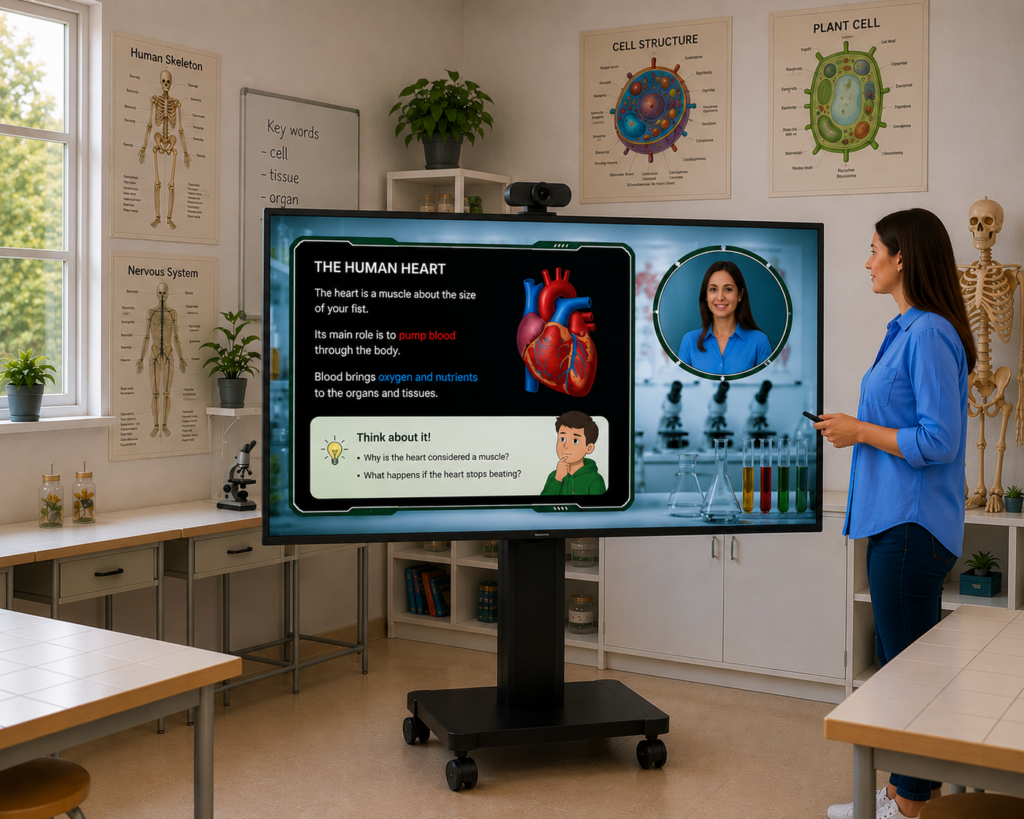
Table of contents
Stoodeo is installed on your interactive display, ready to go. The good news is that you already have everything you need. The only real question now is no longer “does it work,” but “where do I start to get the most out of it this week.”
This article answers that question in the most concrete way possible. We’re going to explore three flagship features through the lens of what they let you create, and for each one, you’ll walk away with a specific capsule to film this week. No theory, no pitch. Three exercises, three results you can see in class. Pick the one that speaks to you, and dive in.
Templates: choosing the backdrop that serves your message
The feature. Stoodeo’s templates are ready-to-use backdrops that you drop yourself into. A map of France to walk through a region’s history, an anatomical diagram to explore blood circulation, a basketball court to break down a game strategy, a literary scene to set the stage for a novel. One click, one backdrop, and the lesson takes on a whole new visual dimension. These educational templates handle the staging for you.
Why it’s powerful. A well-chosen backdrop grabs attention from the very first second and conveys the subject instantly, with no extra technical setup. Students are no longer watching a teacher in front of a wall: they’re traveling through a world that serves the content. Understanding begins with the eyes.
Examples by subject:
- History: the teacher frames an event on a map of Europe, in overlay, like a documentary presenter.
- Biology: a student presents the organ being studied on an anatomical diagram, like a short filmed presentation.
- P.E.: the teacher explains a defensive position on a virtual court
- Literature: a group of students sets the scene of a 17th-century text from a period backdrop
- Languages: a student opens a lesson on public transport from an urban backdrop in London, Paris, or Madrid.
- Visual arts: the teacher comments on a work from the unit from a virtual gallery.
Your capsule to film this week: the chapter-opening capsule.
- Before the lesson. Choose the chapter you’re starting next week. Identify the backdrop that sets up the subject most immediately (a map, a diagram, a scene, a court). Prepare your through line: the big question the chapter is going to answer.
- During filming. Launch Stoodeo on the interactive display and select the template. Film yourself for two minutes maximum: announce the subject, show the backdrop (“we’re going to explore this territory, this mechanism, this strategy”), and pose the guiding question. No more than that, just the opening.
- After filming. Play the capsule at the start of the next lesson, on the interactive display or in self-access mode. Watch the effect on attention: the capsule works like an opening sequence, and your students start out already on board.
Creative variation to take it further. Build a library of opening capsules by subject, and reuse them from one year to the next. The chapter gets underway in two minutes, and you give each new school year a polished way in.

Stylus annotation: making your reasoning visible
The feature. While recording, you can write, highlight, circle, and connect directly on the interactive display, with the stylus. Everything you draw appears in the video, synced to your voice. The backdrop becomes a living board that builds itself before the student’s eyes. This interactive annotation turns a static support into a demonstration in motion.
Why it’s powerful. When the reasoning unfolds on screen at the same time as it’s explained out loud, the student sees the thinking take shape. They witness it being built, step by step. That’s the whole difference between reading a theorem in a textbook and watching it written out live by someone who knows how to handle it.
Examples by subject:
- Mathematics: the teacher breaks down the solving of an equation, circling the critical steps with the stylus.
- Literature: a student dissects a poem, highlighting the figures of speech as they comment on them.
- Biology: the teacher annotates a cell diagram with arrows showing an osmotic exchange.
- History: a student draws a timeline with the stylus to order the events of a period and demonstrate their mastery.
- Geography: the teacher circles zones of influence on a map to explain a geopolitical dynamic.
- Languages: a student reworks a sentence with the stylus, replacing the key words to show a grammatical transformation.
Your capsule to film this week: the annotated demonstration.
- Before the lesson. Take the key exercise from your next class, the one whose method is the most foundational. Run through the three or four decisive steps in your head. Prepare a neutral backdrop or a blank diagram to serve as the support for your annotation.
- During filming. Launch Stoodeo and work through the exercise on screen, annotating with the stylus. For each step, draw, underline, write, and put into words the reasoning behind each choice (“here we have two possible paths, we take this one because…”). Three to five minutes is plenty.
- After filming. Share the capsule with your students as a revision aid. Play it at the start of the next lesson to get the momentum going again.
Creative variation to take it further. Turn this capsule into a fill-in-the-blank demonstration: at a key moment in the reasoning, pause out loud and invite the watching student to anticipate what comes next before you resume. The capsule becomes an interactive exercise on demand.
Your position on screen: staging yourself for the effect you want
The feature. Stoodeo gives you several framing and positioning options: large or small, centered or off to the side, in a face shot, mid-body, or full-length. Each teaching intention has a framing that serves the message better.
Why it’s powerful. Framing isn’t an aesthetic detail, it’s a teaching tool in its own right. A strong, centered presence establishes the authority of your message and captures attention. A discreet overlay off to the side lets the backdrop speak and shifts you into a supporting role. The right framing at the right moment is conscious pedagogical staging.
A few useful pairings:
- Large shot, centered: to announce, to open, to mark a strong transition. You're there, present, setting the frame. It's also the ideal framing for a student presenting their work to the class.
- Mid-body shot, off to the side: to comment on the backdrop while the student observes it. The voice accompanies, the visuals stay in charge.
- Small overlay, in the corner: to step in discreetly while a diagram is displayed full-size. You punctuate, the content dominates.
- Face shot, centered: for a short, personal instruction, or a few caring words addressed to a group.
Your capsule to film this week: two versions of the same instruction.
- Before the lesson. Identify an instruction you give regularly (a homework instruction, the launch of a group activity, the start of an exercise). Prepare a nice, clear statement of it on screen.
- During filming. Film two versions, each under two minutes. Version A: you large and centered, the statement visible behind you, bringing the drive, the energy, the urge to get started. Version B: you small in the bottom right, the statement centered and clearly legible, with you in a supporting role and the statement becoming the star.
- After filming. Compare the two versions, simply by watching them. You’ll know immediately which one fits which context. You’ve just discovered a pedagogical framing tool that will stay in your toolbox.
Creative variation to take it further. Adopt a signature framing for each type of content: you large for chapter openings, you small for detailed answer keys, you in a face shot for personal messages to the group. Your students will subconsciously recognize the type of content before they even start listening.
And now, over to you
Three features, three capsules to film this week, three different moments in the teaching experience. There’s no need to do it all at once. Start with the one that speaks to you most, watch the effect, get the hang of it. The other two will follow naturally.
Stoodeo is built for teachers who love their craft and want to expand what’s possible within it. Educational video in the classroom, here, stays in service of your teaching, never the other way around. You’re in the right place to bring your first Stoodeo video capsules to life.
Stoodeo is free for your first video.